Restaurant Prospector: turning days of lead research into minutes of checking
Restaurant Prospector finds restaurants to pitch and the right people to contact. I interviewed and observed a restaurant-tech sales rep, then designed and built the tool for her with AI coding tools.
- Role
- Freelance designer and developer
- My focus
- User research, UX/UI design and AI-assisted development
- Platform
- Web
- Period
- 2026
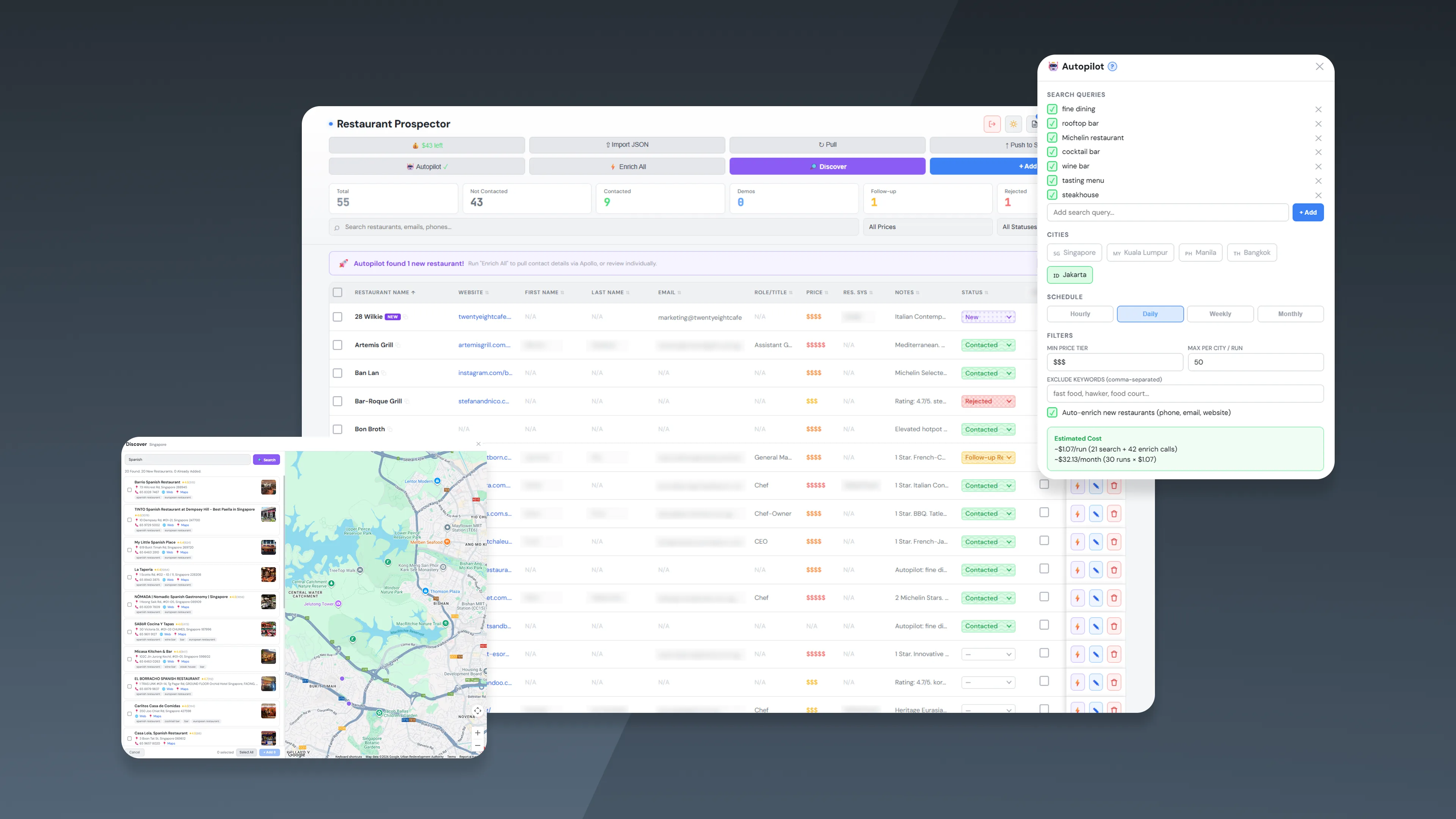
A private tool for one client. Contact details are blurred and the client is not named.
Context
Building a pipeline by hand
A sales rep selling a reservation platform to restaurants built her leads by hand using Google search, Excel and a clunky Salesforce. She searched Google Maps, copied each restaurant into a sheet, then looked for the founder or manager and their email. It should have taken a few hours. In practice it took days she could have spent selling.
Solution
Finding the restaurants worth pitching
Restaurant Prospector finds the restaurants worth pitching and the people to contact there. It searches an area, reads each restaurant’s own site for the booking system it already runs on and holds what it finds in one list she checks before any of it is saved.
Autopilot runs the same search on a schedule, so new restaurants arrive without her going looking for them.
My contribution
Designing in code, beside the person using it
I interviewed her, then watched her work. I designed the tool directly in code and built it with AI coding tools. I kept adjusting it as I watched her use each version.
I shipped it in phases. The first version had her run searches herself. Then came Autopilot, which finds new restaurants on a schedule. AI-drafted outreach would be next, but she prefers to write to restaurants herself, so it is on hold.
Decision 01
Letting her check every contact before it’s saved
Scraped data is messy. A website might give you the web host’s support email, or the sous chef’s name when the manager is listed on the same page. So the tool never writes new details straight into her list. A review screen shows the current value next to each new one, field by field. I removed the Accept All button so every lead gets checked.
Trade-off: It is slower than one click. A wrong name in a cold email costs more than the minute it takes to check.
Decision 02
Showing which booking system each restaurant uses
The tool reads each restaurant’s website and detects the booking system it already uses. That shapes the pitch. A restaurant on a budget platform is likely to care about price, while one on a feature-rich platform cares more about features. Restaurants already on her own platform go into a separate list so she never contacts an existing client by mistake.
Outcome
Giving hours back every month
6-17 hrs
Given back each month
Based on about 7 fields per lead at 1 to 3 minutes each and 50 leads a month. This is an estimate.
15%
Of contacted restaurants booked a demo
Since launch.
What didn’t work
Learning it was a discovery tool, not a CRM
I first shaped it like a CRM, with manual add and import. She never used either, because her company’s Salesforce stays the main record and can’t be linked. The tool turned out to be most useful for discovery. The first budget panel didn’t help either, because its costs were estimates. I later rebuilt it to match Google’s actual bill. That showed me where the money went. One change then cut the cost of each lookup by almost half.